The Financica assistant used to live in one place: a panel in the web app. Useful, but only if you were already in Financica with the right tab open. Most of the time, a question about your books shows up somewhere else. You are in Telegram approving something with a co-founder, or you are already deep in a Claude conversation about next quarter, and the last thing you want is to stop and go log in somewhere.
So we connected it to the tools you already use. You can now link the same assistant to Telegram, Claude, and ChatGPT and ask it about your accounting from any of them.
One assistant, wherever you are
It is the same assistant you already use in the app, carrying the same memory and the same view of your books wherever you talk to it. Ask it something in Telegram in the morning, pick the thread back up in the web app in the afternoon, and it remembers the conversation.
And it only ever sees what you can see. Connecting Telegram or Claude links your messaging account to your Financica user, nothing more. If you cannot open a set of numbers in the app, the assistant cannot read them out to you in a chat either.
What people actually ask it
Most questions about your books are quick ones, the kind you would never open the app for. A few that come up constantly:
- "Who owes me money, and who is most overdue?"
- "How did my cash evolve this year, and what is my runway?"
- "Are my books ready to close for June?"
- "Did any supplier bill get entered twice?"
- "What paperwork am I missing before my accountant asks?"
- "Where is my money going this year?"
- "Send me the income statement for last quarter as a PDF."
The last one matters more than it looks. In a messaging channel, a link to a print page is useless, so the assistant generates a real PDF and hands you the file. Ask for it in French or Dutch and you get it in that language, and Belgian companies get the statutory format automatically. That means you can be waiting for a train and forward your accountant a proper income statement without touching a laptop.
Answers you can look at, not just read
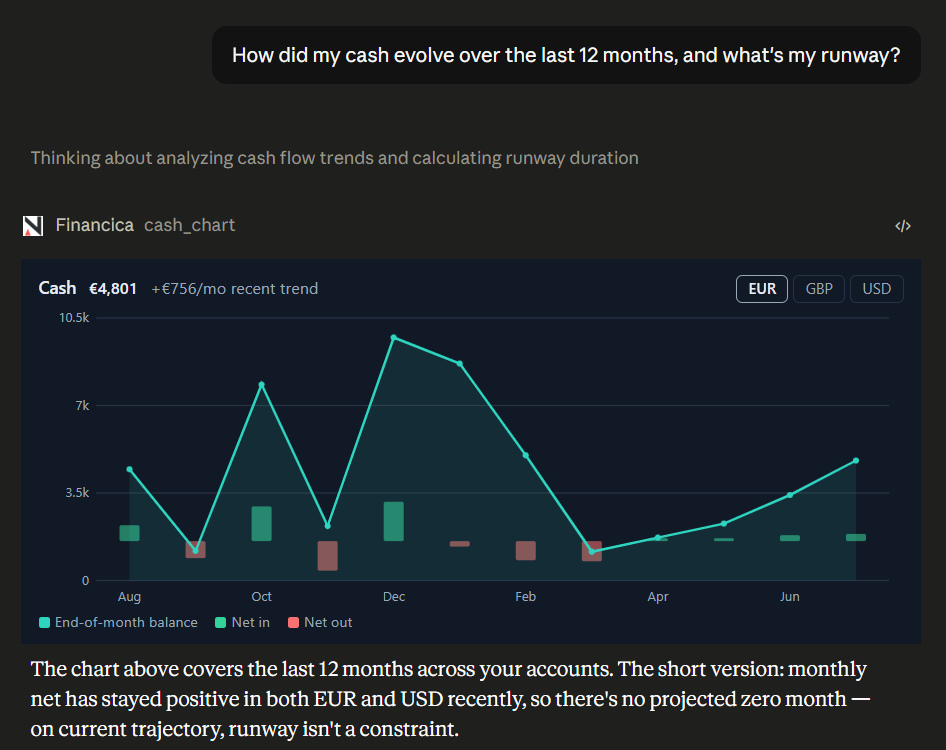
Claude and ChatGPT can show more than text, and we used that. When you ask about cash over time, the assistant does not just tell you the balance went from one number to another. It draws it: a line of your month-end cash, bars for money in and out, and a dashed projection toward the point where you would run out at the current burn. That is the panel in the screenshot above, rendered right inside the Claude conversation.
A trend is one of those things that a sentence flattens and a picture makes obvious. "Cash went from 80k to 62k" hides whether that was a steady slope or one bad month. The chart does not.
On Telegram, where there is no room for an interactive chart, the same question gets you a clean written summary instead. You ask once, and each place answers in the way that fits it.
It stays in its lane
Reading your books is one thing. Changing them is another, and we kept a hard line between the two.
By default the assistant looks things up and explains them. When you ask it to actually do something that touches your records, like creating an invoice or reconciling a payment, it pauses and asks you to approve that specific action first, in whatever app you are using. Nothing changes behind your back, on any channel. Founders can move faster without stepping around their accountant, and accountants can hand off the repetitive parts without losing the final say.
Turning it on
Connecting a channel takes about a minute from your settings, and it is personal to you: each teammate connects their own. The full walkthrough, including how to link Telegram, is in the assistant channels guide, and there is more on what the assistant can do in the AI assistant guide.
The assistant and its channels are available on the Scale and Enterprise plans. If your books already live in Financica, this is the fastest way we know to get from a question to an answer.