A small quality-of-life change shipped today: when you pick a row in the transactions or invoices list, every other row with the same amount and currency gets a subtle teal stripe on the left edge.
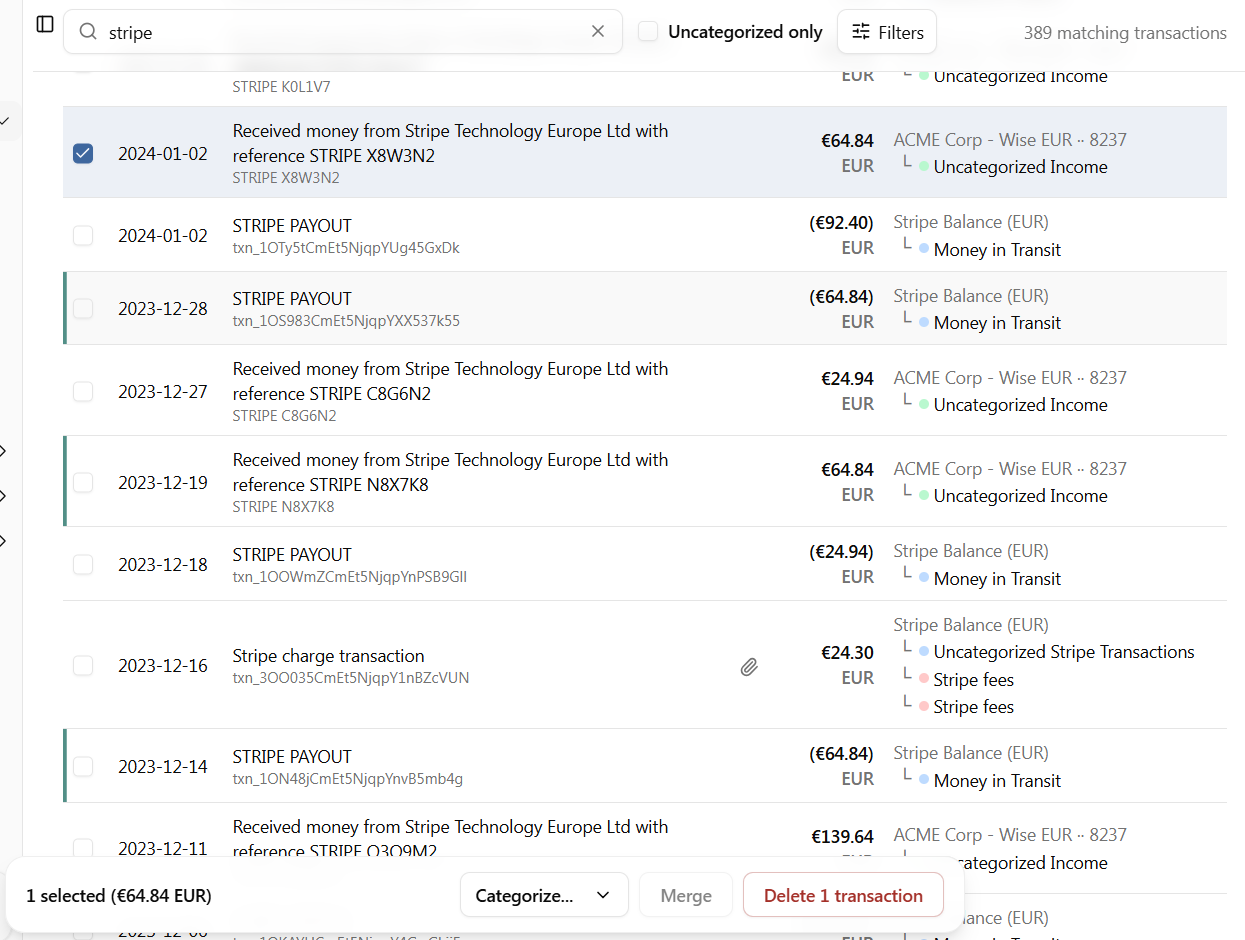
The use case is the one you probably hit weekly. A Stripe payout lands in your bank, and you need to find the matching receipts that add up to it. Or a refund shows up, and you want to pair it with the original charge. Before, you scanned the amount column by eye. Now you just tick the checkbox on one row and the matches jump out.
A few things worth noting:
- The match is sign-agnostic. Select an outgoing payout and incoming receipts with the same amount light up too, which is exactly what you want for payout reconciliation.
- Currency has to match. The same amount in euros does not highlight a row in dollars next to it.
- The cue only shows when exactly one row is selected. Once you select two or more, it steps out of the way so it does not fight with whatever bulk action you are about to run.
- Selected rows themselves now have a clearer blue tint, distinct from the regular hover effect, so you can tell at a glance what is in your current selection.
Available now on the transactions list, the revenue and expense invoice lists, and the payment linking dialog.