A supplier invoices you €1,000 and €999 arrives at the bank. Or a customer pays €1,001 on a €1,000 invoice. Nobody issues a credit note over a euro or wires it back, so the invoice sits in your books as Partially paid or Overpaid indefinitely. It clutters your open-items list and looks overdue when it isn't. Until now, the only way out was a manual journal entry to absorb the difference. Doable, but you had to know the trick.
Financica now handles this natively. When an invoice is essentially settled but a small residual remains, a banner appears at the top of the invoice:
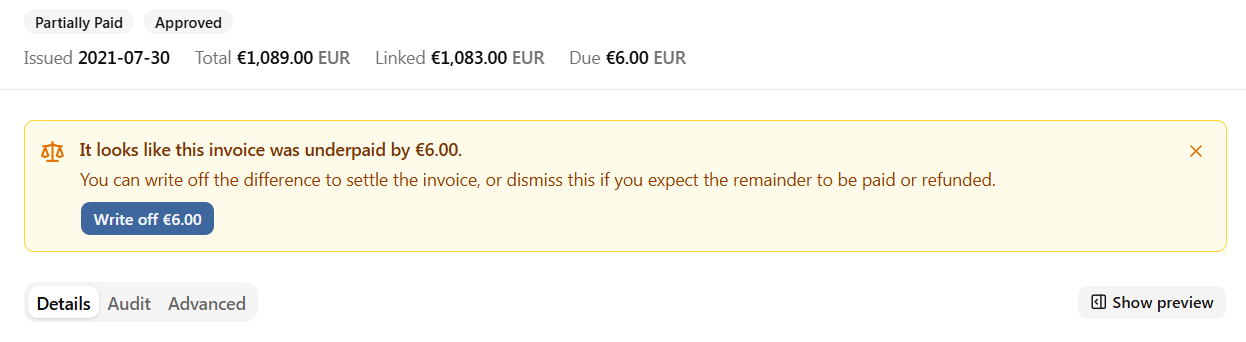
Click the button, confirm, and Financica posts a small balancing entry between Accounts Payable (or Receivable) and a dedicated Payment differences account. The invoice flips to Paid, the banner disappears, and your open-items list gets one line shorter.
What the entry actually does
The write-off is a plain two-leg journal entry:
- It moves the residual off the control account and into Payment differences, a P&L account in the 657 range (Belgian PCMN) that Financica creates the first time you use this. Losses post as debits and gains as credits on the same account, so it hovers near zero over the year. For amounts this small, splitting gains out to a separate 75x account would add a line to your P&L without adding information.
- It is dated at the last payment on the invoice, not the day you clicked, so it lands in the period where the settlement actually happened.
- VAT is untouched. A waived euro is not a price change, so there is no taxable-base correction. A difference big enough to matter for VAT needs a real credit note, not a write-off.
- The entry description says exactly what it is ("Write-off of payment difference on INV-2026-042"), so the journal entry is its own audit trail.
It is also reversible. If the missing euro does arrive next week, the write-off sits in the invoice's Linked payments card like any manually recorded payment: unlink it and choose to delete the underlying transaction, and the invoice returns to its previous state.
When the banner appears
Only when the difference is small: at most 4% of the invoice total, or at most 1.00 in the invoice currency, whichever is higher. A €300 gap on a €1,000 invoice is a missing payment, not a rounding difference, so it never gets a one-click write-off. The 4% does scale with the invoice, and the confirmation always shows the exact amount before anything is posted, so give it a glance on large invoices.
A few more details worth knowing:
- It works on both purchase and sales invoices.
- If you expect the remainder to be paid, or you plan to refund an overpayment, dismiss the banner with the X. It stays hidden unless the outstanding difference changes.
- Foreign-currency invoices keep the existing manual flow for now; the write-off account lives in your organization's currency.
That's it. The banner is live now on every invoice page.