Every Belgian company files its annual accounts with the National Bank's Central Balance Sheet Office. Financica produces the .xbrl file the National Bank's Filing application accepts, built from the same books your balance sheet and income statement are drawn from.
Before you start
The file is produced from Reports > Year-end close, and only once that page is clean. Sign off the year at the foot of that page stays unavailable while anything is blocking, and the sign-off page itself sends you back if something is. Work through the blocking checks first: an account with no statutory rubric, an unposted invoice or a residual balance on a clearing account will all be refused when the file is assembled, because each one leaves the two sides of the balance sheet apart. Locking the year is one of those checks: Lock the year closes every month of the financial year in one go, and the sign-off is offered only after it, so the figures you declare cannot move under the file you produce.
You also need your organization's legal details filled in under Settings > Organization: legal form, enterprise number, registered name, and registered address. These are printed on the filing and none of them can be guessed from your books.
Signing off
On Reports > Year-end close, check that the financial year shown is the one you are filing, then select Sign off the year.
A few things are asked for that are not in your books. If you have filed with Financica before, last year's answers are already filled in, with the general meeting date moved on by a year. Check them rather than assuming: they are your declarations, and they are filed as written.
The date the general meeting approved the accounts. The filing is due within 30 days of that date, and at most 7 months after the closing date. The National Bank rejects a filing whose meeting date is inconsistent with the exercise, so this has to be the real date.
Your valuation rules. A summary of the rules is a mandatory part of the model. Financica offers a standard wording as a starting point, which you should edit to match how you actually value your stock, your receivables and your fixed assets.
Your business court. This is a mandatory mention: the National Bank refuses a filing that does not name one. It follows the judicial district your registered office is in, and Brussels has both a French-speaking and a Dutch-speaking court, so Financica asks rather than guessing. You will find it on your KBO/BCE extract. Only the courts that hear filings in the language you selected are listed, which narrows twenty-nine to a handful; nothing checks that you picked the right division within them, so read it against your extract.
The filing language. Annual accounts are drawn up in the language of the region your registered office is in: Dutch in Flanders, French in Wallonia, German in the nine German-speaking communes. Financica sets it from your postal code. If your registered office is in Brussels you may file in French or in Dutch, so pick the one your accounts are actually written in.
Changing the language rewrites the standard valuation rules in that language, unless you have already edited them, in which case your own text is left alone. It is your text that gets filed, so make sure the two agree.
Your average staff, in full-time equivalents, is also asked for. It is one of the three criteria that decide which model you file.
What the general meeting decided to do with the result. For a company, the sign-off page shows the year's result before appropriation and asks for the dividend, what goes to the legal reserve and what goes to other reserves. Leave a line empty when nothing goes there; whatever is not allocated is carried forward, and the page shows that figure as you type. This is the one answer that is never carried over from last year: last year's dividend says nothing about this one. A liquidation reserve constituted from the year-end page is already in your books, so do not count it here a second time. An association is not asked: it does not distribute a result.
Running the final checks
Run final checks puts your figures through the checks the National Bank publishes, the same ones its Filing application applies on receipt. You watch them go: the count climbs, and View details shows each check as it resolves.
They are reported honestly, which means some are reported as not having run:
- checks belonging to a section your model does not have;
- checks with nothing reported to read, which is normal in a micro filing that omits most annexes by right;
- occasionally, a check Financica could not tie to a rubric. That one is our shortcoming rather than yours, and it is shown rather than counted as a pass.
A failing check is shown by what it is about — "Financial income does not add up" — with the rubrics and amounts behind it, and the National Bank's own reference for the check in small print underneath, in case you want to quote it to your accountant or the Bank's helpdesk.
Once everything holds, the year is signed off. Your declarations are kept, and start next year off. Download XBRL on that page hands you the file for a look; the copy you actually deposit is produced from the Filings section of the year-end page, which also keeps it (see below).
If the accounts cannot be filed yet
Rather than producing a file the National Bank would reject, Financica lists what is still in the way. The usual ones:
Missing from your organization settings. A legal detail is not filled in. The message names the field.
These accounts have no line in the model. An account carries a balance but its code matches no rubric of the statutory model, so its amount would be missing from your totals. Give it a valid account code.
The balance sheet does not balance. Something is unaccounted for. The year-end close checks will point at it.
The result in the income statement does not match the one carried in equity. Your two statements disagree about the year's result by more than rounding, which normally means an account is missing from one of them.
Financica cannot yet produce this model. See below.
Which model you file
Which of the statutory models applies depends on two separate things: what kind of company you are, and how big you are.
Since the Companies and Associations Code abolished capital for the SRL/BV and the SC/CV, those forms file a without capital model. Size is decided by staff, turnover and balance sheet total: you are micro, or small, when you exceed at most one of the three limits.
Financica currently produces the micro model for companies without capital, which covers most small SRL/BV companies. If your company files another model, Financica tells you rather than producing a file that would be refused, and you will need to file that one another way for now.
Bear in mind that the size criteria are assessed across the group you belong to and, after your first financial year, over two consecutive years. Financica suggests a size from your own figures alone, so check it against your situation.
Profit appropriation
Annual accounts are filed after appropriation: the general meeting has already decided what happens to the year's result before the balance sheet is drawn up. Your books hold the year as posted, which is the position before that decision.
So the appropriation is something you declare, not something Financica reads, and you declare it once, when you sign off the year. Anything the meeting sets aside in reserves, and anything it distributes as a dividend, moves out of the carried-forward result in the file. The corporate tax return produced from the same year-end page reads the same declaration for its dividend line, so the two filings cannot disagree about it.
Filing the file
Financica produces the file. It does not send it. Upload the .xbrl to the National Bank's Filing application, which validates it again on receipt and asks you for the filing fee.
The file you deposit comes from the Filings section at the foot of Reports > Year-end close. The Annual accounts card lists what it needs, the sign-off and the whole-year lock, and Produce and record builds the XBRL from your books, keeps it as the year's copy of record and downloads it. That copy is what you filed: the card shows when it was recorded and by whom, and Download hands it back unchanged, which is the reference if a figure is ever queried. Only an administrator can record it.
Producing the file again replaces the copy, after asking. That is what you want after reopening a month to correct something: reopen from the periods settings, correct, lock again and produce again.
Signing off the same year again replaces the earlier sign-off rather than adding to it: a second sign-off before you deposit is simply you changing your mind. Accounts already deposited are corrected with a new deposit, below.
Accounts the National Bank has published
The National Bank publishes every deposit a few days after accepting it, and Financica keeps its copy with the year. When you create a Belgian company in Financica, its deposits of the last five years are brought in on their own.
Once a year is published, the Annual accounts card shows the deposit that stands, with its date and reference, and Download gives you the National Bank's PDF. For a deposit made since, choose Check the NBB for new deposits from the card's … menu. These copies are the National Bank's own record: there is nothing to enter, undo or upload in their place.
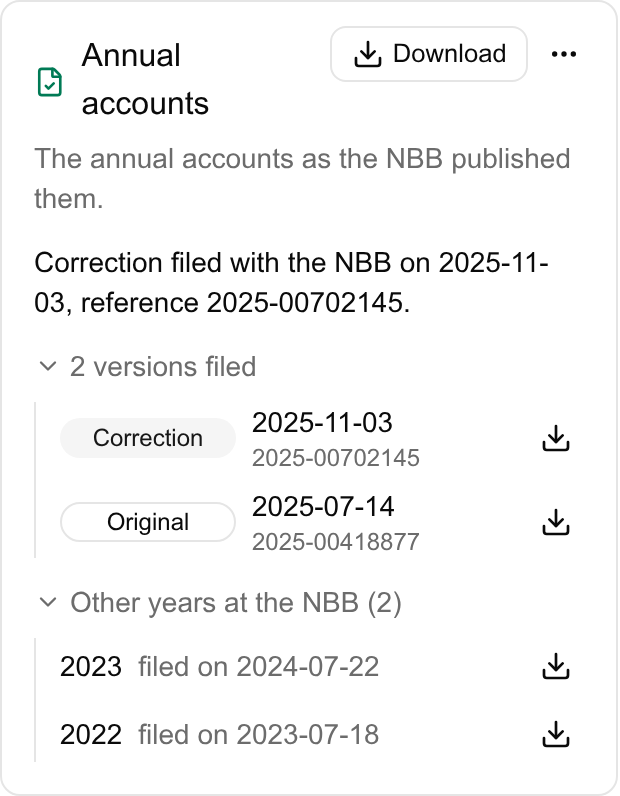
Versions filed opens the year's history: the original deposit and each correction after it, each marked as such and each downloadable, the one in force listed first. A company that files several sets of accounts, such as statutory and consolidated accounts in two languages, sees each set listed with its own versions. Other years at the NBB lists the other years published, with the PDF in force for each; a year links to its own close.
Correcting deposited accounts
The National Bank corrects accounts with a new deposit marked as a correction; the original stays published beside it. To prepare one, fix the books first: reopen the months concerned, correct the entries, lock the year and sign it off again. Then choose Prepare a correction from the card's … menu. Financica builds the XBRL marked as a correction and downloads it, and the card reminds you it is still to deposit until the National Bank publishes it. Deposit it in the Filing application as a correction.
Related
- Year-end close: the checks to clear first.
- Corporate tax: booking the tax charge, which has to be in the books before the accounts can be filed.
- Balance sheet and income statement: the statements the filing is built from.